Seedream Character Consistency: Multi-Turn Guide | Z Image Tutorial
Learn how to maintain character consistency across multiple images using Seedream (Z Image) multi-turn conversation format. Define characters once, make precise edits while preserving details.
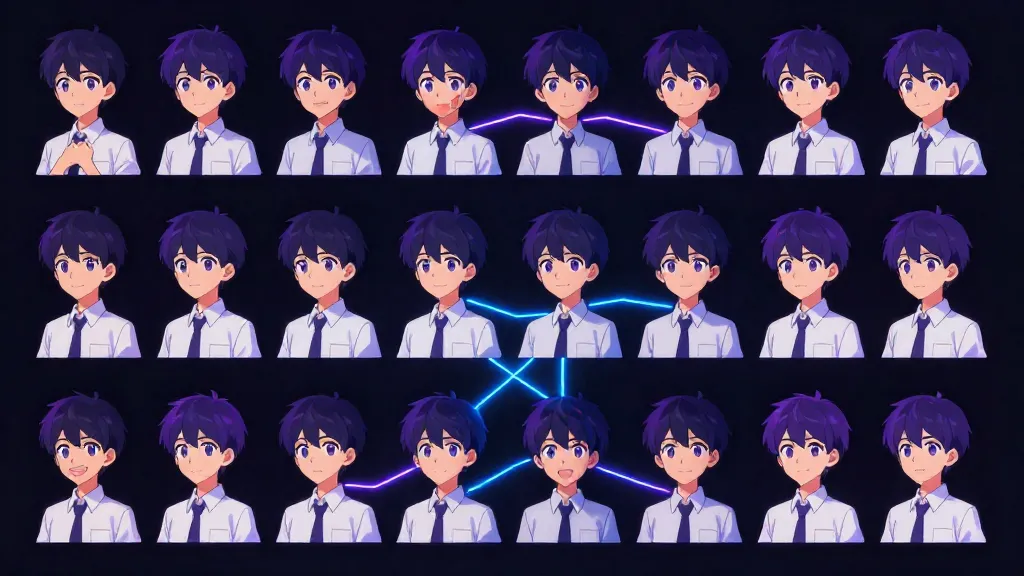
One of the biggest challenges in AI image generation is maintaining consistency across multiple images. Seedream Turbo addresses this with its unique multi-turn conversation format.
This guide explains how to define characters once and make precise modifications while preserving their core identity.
Understanding Seedream's Chat Format
The Qwen3-4B Foundation
Seedream Turbo uses Qwen3-4B as its text encoder. This model was trained on conversations with a specific structure:
<|im_start|>system
Instructions for the model<|im_end|>
<|im_start|>user
The user's request<|im_end|>
<|im_start|>assistant
<think>
Model's reasoning process
</think>
Response to the user<|im_end|>
When you use Seedream through its custom ComfyUI nodes, you can access this full structure.
Why This Matters for Consistency
The model was trained to:
- Follow system instructions throughout the conversation
- Remember context from previous turns
- Use
<think>blocks for reasoning about changes - Maintain consistency while making requested modifications
By structuring your prompts as multi-turn conversations, you give Seedream explicit context about what should stay the same.
The Multi-Turn Workflow
Step 1: Define Your Character (First Turn)
Create a comprehensive character profile with every detail you want preserved:
# Character Profile: Sarah Chen

## Core Identity
- Name: Sarah Chen
- Age: 28
- Ethnicity: Chinese-American
- Build: Slim, 5'6"

## Face & Features
- Face Shape: Oval with high cheekbones
- Skin: Fair with warm undertones, light freckles across nose
- Eyes: Dark brown, almond-shaped, slight upturn at corners
- Eyebrows: Natural, slightly thick, well-groomed
- Nose: Small, slightly upturned
- Lips: Full, natural rose color
- Expression: Default confident half-smile

## Hair
- Color: Black with subtle warm brown highlights
- Length: Mid-back
- Style: Usually worn down, slight natural wave
- Texture: Thick, healthy, glossy

## Distinguishing Features
- Small beauty mark below right eye
- Delicate gold hoop earrings (always wears)
- Silver necklace with crescent moon pendant

## Default Attire
- Style: Modern professional, minimalist
- Colors: Often black, white, navy, burgundy
- Preference: Clean lines, quality fabrics
Step 2: First Image Generation
Use the full character sheet in your first prompt:
[System Prompt]
Generate a photorealistic portrait following the character sheet exactly.
Maintain all specified features and distinguishing marks.

[User Prompt]
# Character Profile: Sarah Chen
[Full character sheet from above]

Current scene: Professional headshot, studio setting, soft lighting

[Think Block]
Subject is Sarah Chen as defined in the character sheet. Key features
to ensure: high cheekbones, beauty mark below right eye, gold hoop
earrings, crescent moon pendant. Setting is studio, keep background
simple grey gradient. Lighting should be soft and flattering.

[Assistant Response]
Here's Sarah Chen's professional headshot as specified.
Step 3: Make Modifications (Second Turn)
Now request a specific change while referencing the established character:
[User Prompt]
Change the setting to a Tokyo street at night. Keep Sarah exactly
the same - her face, hair, earrings, necklace - but put her in
a casual outfit: black turtleneck and jeans.

[Think Block]
Preserve: Face shape, skin tone, freckles, eye shape, beauty mark,
earrings, necklace. Change: Setting to Tokyo night street, clothing
to casual black turtleneck and jeans. Add environmental lighting
from neon signs while maintaining face recognizability.

[Assistant Response]
Here's Sarah on a Tokyo street at night in casual wear.
ComfyUI Implementation
Required Nodes
SeedreamTextEncoder
- Main node for first turn
- Inputs: system_prompt, user_prompt, thinking_content, assistant_content
- Outputs: conditioning, formatted_prompt, conversation
SeedreamTurnBuilder
- Adds subsequent turns to conversation
- Inputs: previous (conversation), user_prompt, thinking_content
- Outputs: conditioning (when clip connected), conversation
Basic Workflow
CLIPLoader (Lumina 2)
       ↓
SeedreamTextEncoder ──────────────────────→ KSampler
├── system_prompt: "Generate photorealistic..."
├── user_prompt: [Character sheet]
├── thinking_content: [Reasoning about features]
└── assistant_content: [Brief response]
Multi-Turn Workflow
SeedreamTextEncoder (Turn 1: Character Definition)
       ↓ conversation
SeedreamTurnBuilder (Turn 2: First Modification)
       ↓ conversation
SeedreamTurnBuilder (Turn 3: Second Modification)
       ↓ conditioning
KSampler
Settings
| Parameter | Recommended Value |
|---|---|
| add_think_block | true |
| is_final (TurnBuilder) | true (on last turn) |
| template_preset | photorealistic or custom |
Complete Example: Walter Finch
Let's walk through creating a consistent character across multiple images.
Turn 1: Define Walter
System Prompt:
Generate an image in classic American comic book style.
Bold outlines, flat colors with halftone shading.
User Prompt:
# Character Profile: Walter Finch (Wally)

## Core Identity
- Name: Walter Finch (Nickname: Wally)
- Gender: Male
- Age: 72
- Ethnicity: Caucasian (British descent)
- Skin Tone: Fair, warm sun-kissed glow on cheeks and nose

## Head & Face
- Face Shape: Oval, prominent jawline, receding hairline
- Eye Color: Ice-blue with subtle gold flecks around the iris
- Hair: Pure white, side-parted, full beard and mustache
- Glasses: Thin, gold-rimmed reading glasses
- Expression: Warm, gentle smile with a twinkle in his eye

## Attire
- Light gray and blue checkered button-down shirt
- Dark grey wool trousers
- Brown leather loafers

## Props
- Pale lavender ceramic mug of coffee
- Gold pocket watch chain visible in breast pocket
Think Block:
Creating Walter "Wally" Finch: 72 years old, British descent,
warm grandfather type. Key features: ice-blue eyes with gold
flecks (distinctive), gold-rimmed glasses, full white beard
side-parted hair. Must include: lavender coffee mug and gold
pocket watch chain. Style: American comic book with halftone.
Assistant Response:
Here's Walter Finch, the kindly British gentleman.
Turn 2: Modify Beard Color
User Prompt:
Let's change his beard to have some red mixed in with the white.
Keep everything else exactly the same.
Think Block:
Modifying beard only: change from pure white to red and white
mixed. Preserve: ice-blue eyes with gold flecks, gold-rimmed
glasses, facial structure, lavender mug, pocket watch chain,
checkered shirt, warm expression.
Turn 3: Add New Element
User Prompt:
Let's put a cute baby flying sloth hovering above his head too.
Think Block:
Adding element: baby flying sloth above Walter's head. Preserve
all of Walter's features including the red-white beard from
previous turn. The sloth should be small and cute, floating
or hovering position.
Result
The final image contains Walter with all his defined features, the red-white beard modification from turn 2, and the flying sloth addition from turn 3.
Why Using Qwen3 for Prompt Generation Helps
Seedream's encoder is Qwen3-4B. All Qwen3 models share the same tokenizer.
When you use a Qwen3 model to generate your character descriptions:
- Same vocabulary means same token IDs
- Semantic nuances transfer directly
- Think block reasoning primes the encoder
For best results, consider using Qwen3-72B or larger to generate detailed character sheets, then feed them directly to Seedream.
Example Qwen3 System Prompt
You are a visual prompt engineer for Seedream Turbo.

Generate detailed, visually-specific character descriptions.
Focus on concrete visual details - colors, textures, specific
features. Avoid abstract concepts.

Structure your output as:
1. <think> block with visual planning
2. Hierarchical character profile with sections

The output will be used directly as a Seedream prompt.
Tips for Better Consistency
Be Exhaustively Specific
Don't leave anything to chance. If you want specific eye color, say exactly what it is. "Blue eyes" is vague. "Ice-blue with subtle gold flecks around the iris" is specific.
Use the Think Block
The think block lets you explicitly state what to preserve:
<think>
Changing: outfit to summer dress
Preserving: face shape, eye color (hazel with amber ring),
beauty mark on left cheek, ear piercings (two in left ear),
nose shape, lip fullness
</think>
One Change Per Turn
Don't overload modifications. Make one targeted change per turn:
Good:
- Turn 2: Change outfit
- Turn 3: Change background
- Turn 4: Add accessory
Risky:
- Turn 2: Change outfit AND background AND add accessory AND alter lighting
Reference Previous Content
In later turns, briefly reference what should stay:
Keep Sarah's face, hair, and jewelry exactly as before.
Only change her outfit to a red evening gown.
Consistent Style Markers
Keep style keywords consistent across all turns:
[Every turn ends with]
photorealistic, 8k, professional photography, shot on Canon EOS R5
Limitations & Expectations
What Works Well
- Preserving distinctive features (scars, beauty marks, eye color)
- Maintaining clothing style across scenes
- Keeping accessories consistent
- Changing backgrounds while preserving subject
What's Challenging
- Exact face reproduction (this isn't face-swap)
- Perfect consistency across wildly different poses
- Maintaining consistency across different art styles
Realistic Expectations
Multi-turn conversation improves consistency but doesn't guarantee perfection. Expect:
- 80-90% feature preservation with good prompting
- Occasional need for regeneration
- Better results with distinctive characters
Troubleshooting
Features Drifting
Problem: Character looks slightly different each generation.
Solution: Add more specific distinguishing features. Instead of "brown hair," use "chocolate brown hair with copper highlights, falling to mid-back, slight wave, side-parted."
Modifications Not Applying
Problem: Requested changes don't appear.
Solution: Be explicit in think block about what changes. State the change first, then list what stays the same.
Style Inconsistency
Problem: Art style changes between turns.
Solution: Include style keywords in system prompt and repeat them in each turn's assistant response.
Template Files
Seedream includes 140+ templates in ComfyUI. For character work, try:
| Template | Best For |
|---|---|
| photorealistic | Realistic characters |
| character_design | Reference sheets |
| comic_american | Comic book style |
| anime_ghibli | Ghibli-style characters |
| portrait_studio | Studio portraits |
Access via template_preset in SeedreamTextEncoder.
Get Started
- Download ComfyUI nodes: Comfy-Org/z_image_turbo
- Create a character sheet using the template above
- Start with Turn 1 - define everything
- Iterate with Turn 2+ - make targeted changes
Or practice basic prompting at seedream.vip.
References
Explore Seedream at seedream.vip — free, unlimited.
Keep Reading
- Seedream Prompt Engineering Masterclass — Visual vocabulary and formulas
- ComfyUI Custom Nodes Guide — Full node reference
- What is Seedream Turbo? — Complete beginner's guide